The bottleneck
is us.
AI already works for hours on its own and finishes the job. The limit is how ready we are to use it, not how good the model is.
Today's menu
- Slow start, and permissions
- Learn with files
- Teach yourself and the AI
- Connectors, commands and feeds
- Loops, in parallel
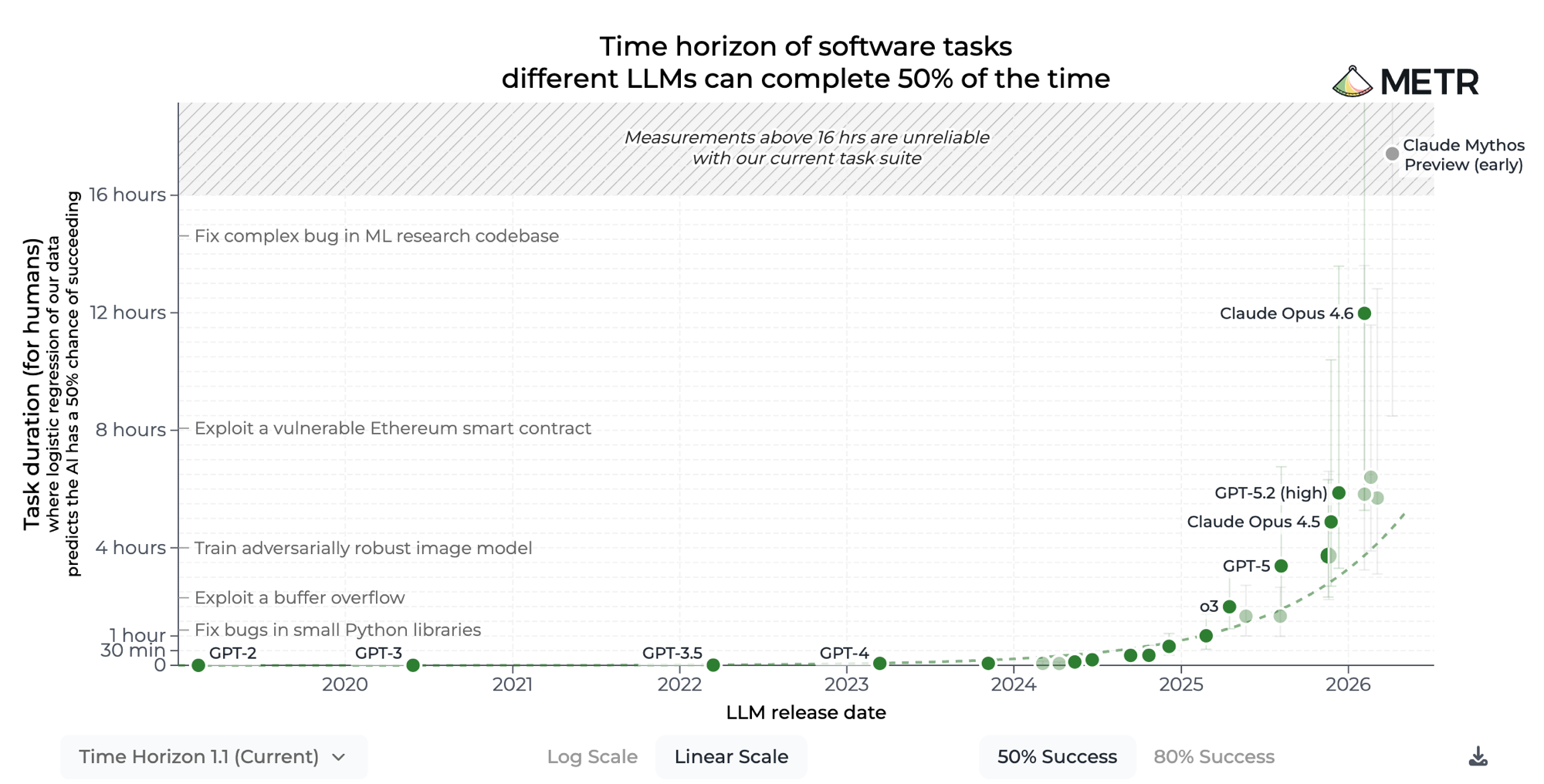
It already runs for eight-plus hours
It works unsupervised and finishes the job, and most tasks fit inside that window.
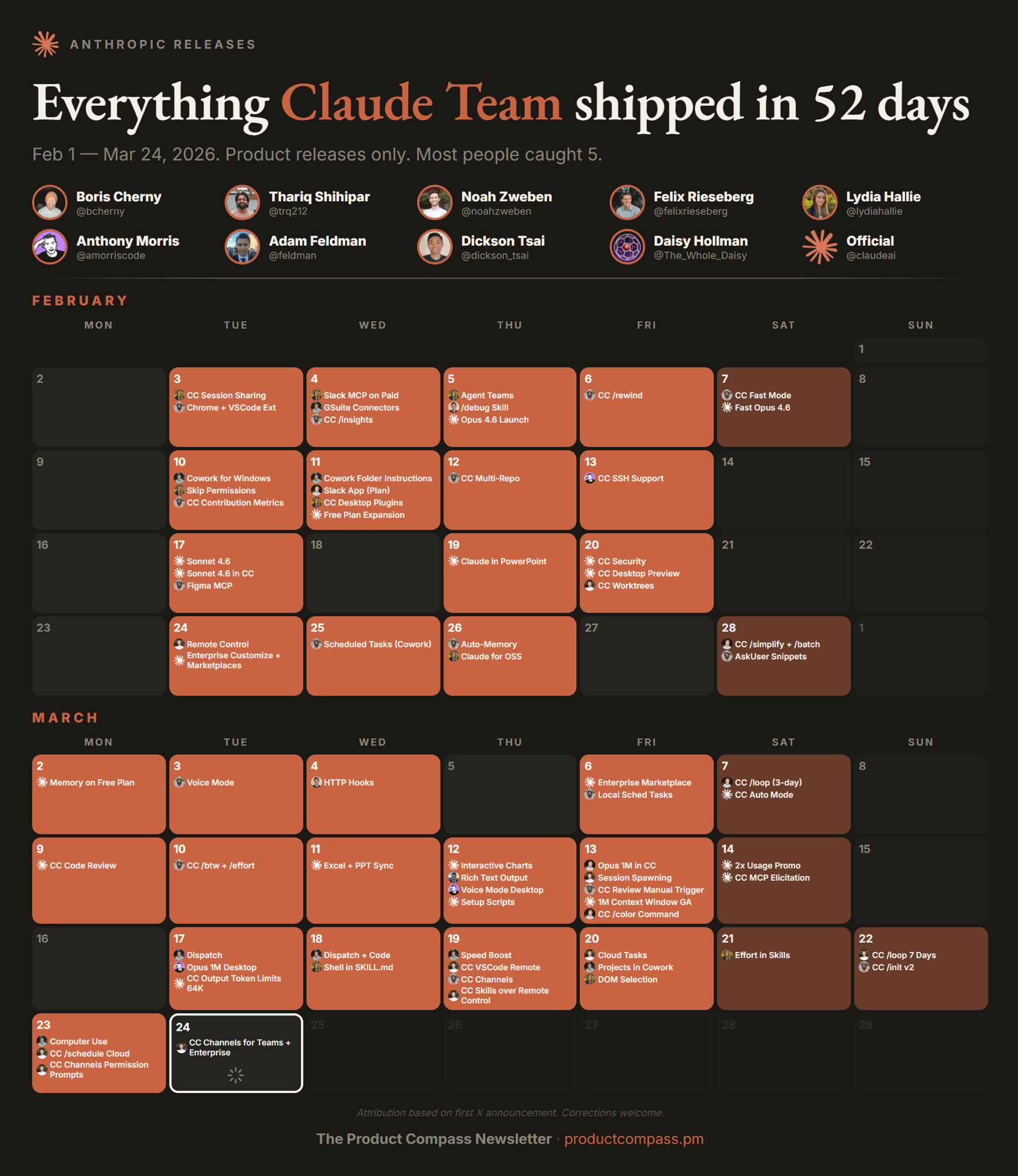
The proof: Claude ships every single day
Anthropic runs AI throughout its own engineering pipeline, so the technology is ready enough to build on.
Source: The Product Compass. Anthropic releases, Feb-Mar 2026.
So, what is Claude Code?
An LLM with access to a whole computer, and to the project folder you point it at. That means it can stay always on and you can watch every action it takes. Connecting it to your other systems is straightforward, and stays under your control.
Start in the right tab
One model, three ways to work. In Chat you drive every turn. Cowork takes a folder of files and needs no terminal. Code takes a whole project and gives you every control. Today we're in Code.
Bring to the workshop: a folder to work in, Git installed, and a Vercel account you can log into.
Decide how much rope it gets
You choose the permission mode at the start of a session, and change it whenever you like. Start tight, loosen as you trust it.
Manual
Asks before every edit and every command, and shows you the diff. Start here, and spend one session just watching what it actually does.
Accept edits
Auto-accepts file edits, still asks before running other commands. The daily driver once you know what to expect.
Plan
Reads and explores, then proposes an approach and changes nothing. Use it for anything you'd want to review before it happens.
Auto & Bypass
Auto runs everything with safety checks in the background. Bypass skips the prompts entirely, so keep it to sandboxes and throwaway VMs.
Starting a
session
Pick the environment, the folder, the model and the mode. Then watch it work, and interrupt it mid-run.
- Set Local, choose a project folder, send a first task
- Stop it mid-action, and steer it without stopping
- Switch the mode selector from Manual to Accept edits
- Cmd+N for a second session, with its own git worktree
Quality depends on your specs, not the model
Ask for "a buzzword bingo game" and you get a grey table. Add a shuffled card, sound, a win counter, a theme and confetti on every BINGO, and you get something you'd send round. You specified what "correct" means.
Try it: paste this
One plain sentence, with no setup and no boilerplate. Copy it into your agent, and a working game appears in the Browser pane.
Try again with improved specifications
Same game. Now you define what "good" means, and the model follows every word.
Now give it a link
A file on your laptop is not something you can share. One more sentence turns it into a URL, and the whole team can play it from their phones.
vercel --prod gives a public URL · plain vercel makes a preview, and previews sit behind a login
Chat, files & context
The agent already has the folder, so there is nothing to upload or download. You just point at what matters.
- Type @ and a filename to pull a file into the conversation
- Drag a PDF or a screenshot straight into the prompt box
- The + button: attachments, skills, connectors, plugins
- Ask it to write a file, then click the path to open it
Add your voice and design
AI output defaults to generic because nothing tells it otherwise. Give it your voice and your design, and that stops.
Or start from a person.md
Seven ready-made voice profiles from the Prosus and Naspers comms team, built from the public web. Pick one, download it, and move it into your project folder.
Inside fabricio-bloisi/person.md
One file, and the agent already knows how to sound like him: tone, vocabulary, structure, even the guardrails.
Tone & persona
Optimistic, forward-looking, ambitious. Inspiring, energetic, authoritative, direct: a visionary tone that pushes bold aspirations and rapid execution.
Vocabulary
Action-oriented words like "abundant," "moat," "discipline," "compounds," plus tech/business terms: "AI native," "ecosystem," "high-growth startups."
Structure
Opens with a personal anecdote or bold statement, builds a clear argument, closes with a call to action or a visionary outlook.
Drafting guardrail
Drafts must be fact-checked and approved before publication. Never invent experiences, quotations, or implied endorsements.
Context that survives the session
Every session starts with a blank memory. CLAUDE.md is the file it always reads first, and it can pull in others with @. Write it once, and you stop re-explaining yourself.
/init writes you a first one · /memory opens them
Wire it into CLAUDE.md
Drop the file you just downloaded into your project folder and import it, with a line on when it matters: when it explains something to you, and when it writes anything that leaves the building.
Create a design.md
Point an agent at a site you love. It reads the look, saves a design.md, and imports it the same way. From then on everything it builds is on brand.
Skills, and where
they live
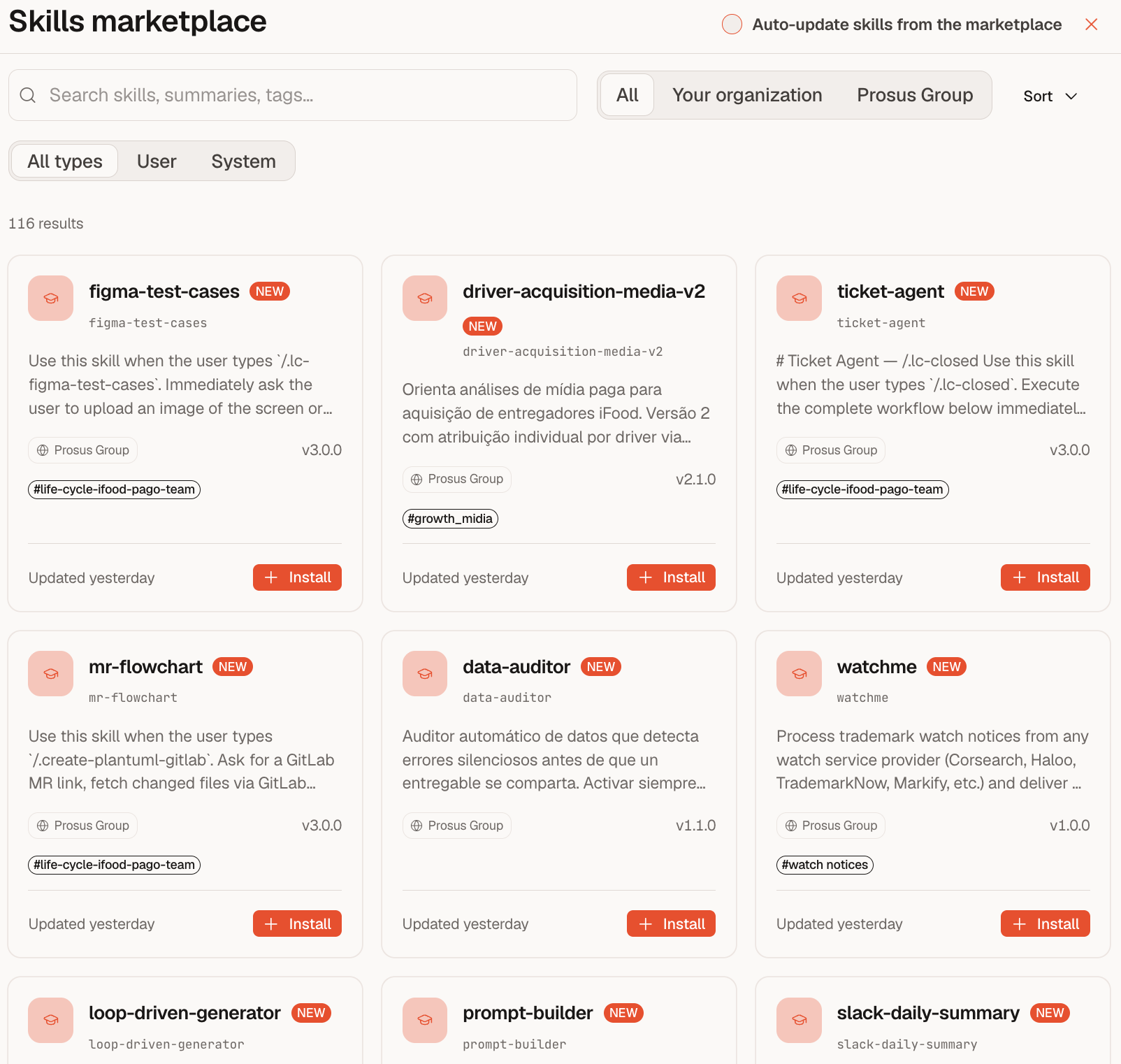
A skill is a folder with a markdown file in it. Drop one in and the agent can do something it couldn't before.
- Type / in the prompt box to see everything available
- Drop a SKILL.md into ~/.claude/skills/blog-post/, and there it is
- + → Plugins → Add plugin: whole bundles from a marketplace
- Customize in the sidebar: skills, plugins and connectors in one place
Install two skills
Skills install from a repo in one line. Copy each command, paste it in your terminal, and hit enter. blog-post writes the posts, html-visual makes them look good.
Restart Claude Code, type / in the prompt box, and both should be in the list.
Write a blog, in your voice
Two skills, one prompt: blog-post drafts three posts in your tone, html-visual turns them into a site you can send to anyone.
Teach AI your business
A handful of markdown files give an agent the context a new hire would need: who's who, and what the company is actually trying to do. Drop in people.md, okr.md, strategy.md, and every task lands in context.
One voice. Every artifact.
Turn your voice and design into agent-readable files. They carry from task to task, so the same identity sits behind your decks, emails, and apps.
Show off your blog
Pull up the Vercel URL your blog just landed on. Drop the link in the chat, and let's read a few takes on AI slop out loud.
Learning, personalized
Tell AI who's reading, their role and their background, and one idea becomes two explanations. The same concept, reframed for an exec and an engineer, each in their own vocabulary.
Explain me skills
Before you build one, let AI explain how skills work, reframed for you, using the person.md your CLAUDE.md already loads.
One topic, two readers
The same skills, read two ways. The MBA gets the business case. The engineer gets the implementation.
A skill is a standard operating procedure your agent never forgets
You document the process once, the way you'd write an SOP for a new analyst, and the agent then executes it the same way every time. Nobody has to be onboarded, and the procedure doesn't drift as people come and go.
Reusable instructions, loaded on demand
A skill is ~/.claude/skills/<name>/SKILL.md: YAML frontmatter (a name plus a trigger description) and a body of step-by-step instructions. The agent matches the request against the trigger, and if it fires, it injects the file's contents into context for that turn. It is a system prompt fragment, loaded lazily and dispatched at runtime. Nothing is fine-tuned, there are no embeddings and no retrieval pipeline: just conditional context injection, versioned as a file in your repo.
When to use skills
Notice yourself correcting your agent twice, or a process nobody's written down that you need done reliably. That's the signal: capture it once, as a skill, and stop repeating the correction.
Automate your first skill
Capture it once and never prompt it again. It lands in ~/.claude/skills/ and loads itself whenever it's relevant.
Learning to make videos is just installing a skill
Run npx hyperframes skills once. It installs itself into Claude Code, and from then on a long write-up becomes a 30-second video. Your voice and metaphors carry into the visuals too.
Take a break.
Grab a coffee, stretch, reset. We pick up right after.
Connect Slack and your mail
Two connectors, and your agent can read the two places every comms job actually starts.
- + → Connectors, pick Slack, approve it in the browser
- Same again for Gmail, which comes with Google Workspace
- Ask "what connectors do you have?" and watch it list them
- Settings → Connectors to re-scope or disconnect at any time
Connect Slack
Everything that happened this week is already written down, just scattered over forty channels. Your agent can read all of it at once and tell you what an outsider would care about.
It reads exactly what your account can read, and nothing beyond that.
Read the week
Point it at your own workspace and let it find the story you'd otherwise miss.
Connect your mail
The pitch, the deadline and the correction all land in the same inbox. An agent can triage it in seconds. But mail is the one source strangers can write to, so keep it read-only.
Give it reading rights. You stay the one who presses send.
Triage the inbox
It won't draft or send anything. You just get the table you wish you had on Monday morning.
Wrap both in a command
A skill loads itself when it's relevant. A command you fire on purpose. It's a markdown file in .claude/commands/: name it, and it appears under / for you and for everyone who clones the folder.
Build /comms-brief
One command that reads both connectors and hands you the brief, in your voice, every Monday.
Anything not in the list
Your monitoring tool, your newsroom, your analytics: if it isn't behind the + button, it goes in a .mcp.json at the root of your project folder.
Confirm the source is trusted, and that it won't expose easily prompt-injected systems.
Build your own media monitor
You don't need a connector for this. RSS is just a public URL, and someone has already made a list of the feeds worth reading.
- Pick 8-10 feeds: your beat, your peers, your loudest critics
- Have the agent fetch and dedupe them into one file
- Rank by what moves our narrative and who has to respond today
- Keep one living monitor.md, and reshape it rather than appending to it
Ship it in twenty minutes
One prompt to start. Then keep nudging it, because the monitor gets sharper every pass.
Density beats volume
AI made content cheap to produce, but reader attention didn't grow. Don't ship 80 pages. Make it dense, lead with hierarchy, and people will actually give you feedback.
Cut it to one page
Turn a long report into a single dense HTML page that earns feedback.
Stop steering.
Let it learn.
Give AI a goal and let it research and build on its own, improving through repeated trial, measurement and revision.
Just keep nudging
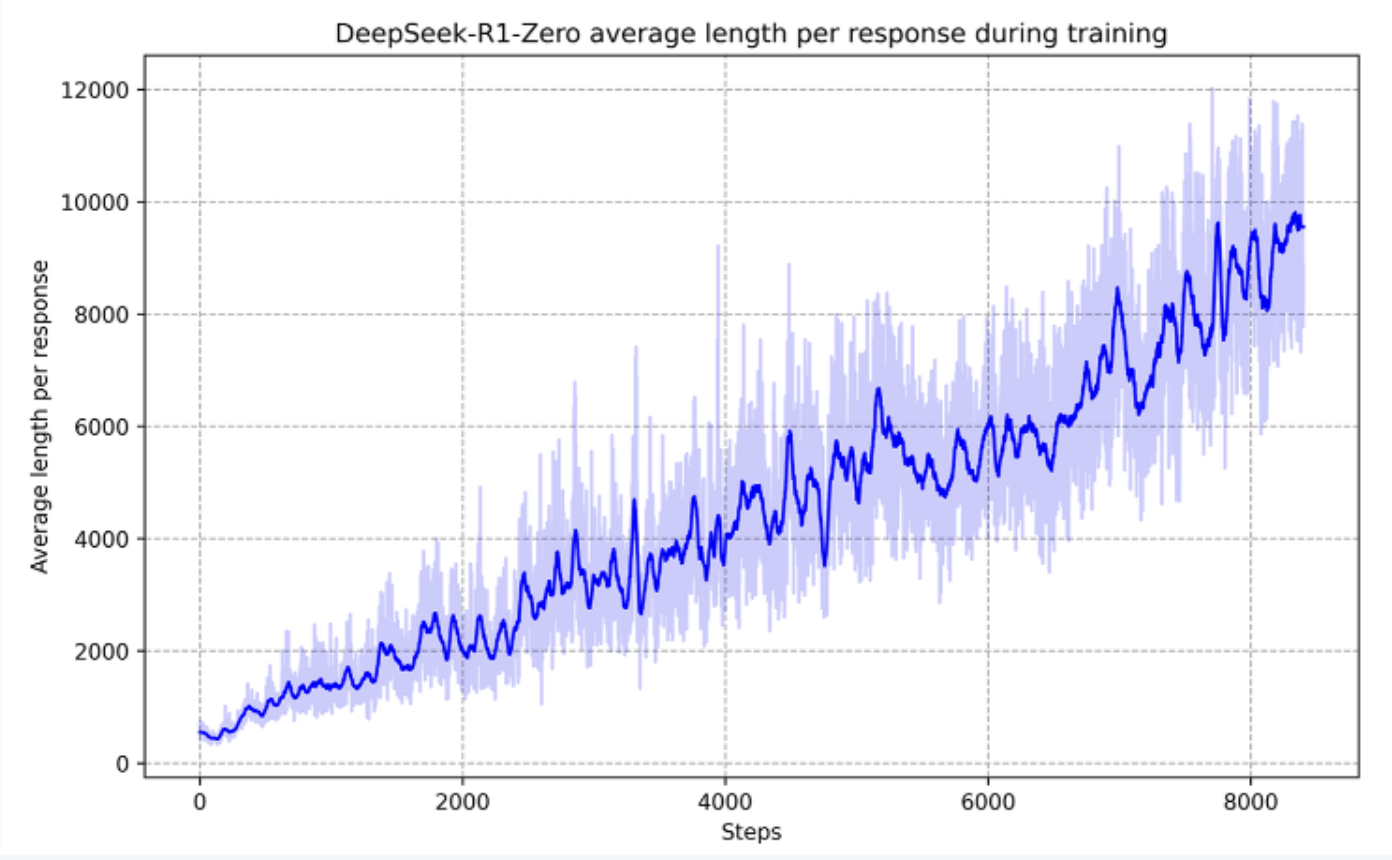
Small, repeated nudges compound. This is the same loop that taught DeepSeek-R1 to keep thinking longer on its own.
Your turn: research it
Point it at a real question and let it run. We'll sharpen the technique on the next slides.
Don't one-shot the search
The agent won't nail the query on the first try, because the web is too big. Loop it instead: search, evaluate the source, find the gaps, then dig deeper or adjust. A depth-first beam search.
Loop the search
One living report, five passes. It finds its own gaps and digs deeper.
Let it loop and review
Give it a goal and let it loop: create, review, revise, repeat. A model rarely catches its own faults while generating. But force it to review, again and again, and quality climbs with every pass.
Knowledge sharing across portfolio was never this effective
A loop running at one company surfaces strategies that transfer. Point a second company's loop at the same learnings and it skips the trial-and-error the first one paid for.
Verification is the new bottleneck
As generation gets nearly free, verifying what's actually right becomes the constraint. Prosus's edge is a billion customers, which is a verification layer at a scale very few companies can put together.
Thank you.
The bottleneck was never the model. Go build.